


Some images are sourced from FamilyMart Japan; the illustrations are for reference only.
Congratulations on winning the lottery, whether it was for an Early Entry Ticket or a Cosplay Changing Room Early Entry ticket! Before the event starts, you can get your ticket stub by going to a FamilyMart store! This article explains how to pick up your tickets at FamilyMart. If reading the text is difficult, please check the video tutorial version below.
First, you need to check your TicketPay account or email to get the following two pieces of information:


The first is knowing the "第一番号(企業コード)", which is usually fixed...
The second is knowing the "第二番号(引換番号)", which is unique, similar to a password.
Next, if you chose the convenience store payment method, remember to prepare cash. You need to prepare cash for 5,000 yen (Early Entry Ticket fee; COSPLAY tickets are 3,000 yen) + 330 yen (system service fee). All of these must be paid in cash, so please prepare it in advance.
If you paid 5,330 yen or 3,330 yen online, you do not need to prepare cash at the store.
The specific ticket collection process is as follows:
1、Find a FamilyMart store that has a multi-function copier.
You can use the map on FamilyMart's official website to find stores that support multi-function copiers (https://www.family.co.jp/store.html; click here for the English map version). Taking Taitō-ku, Tokyo, as an example, after visiting FamilyMart's store search website, you can see that all the locations marked on the map are stores with multi-function copiers. It is recommended to find a nearby store that is not too crowded (especially if you are concerned about your proficiency).

2、Go to the store and find the multi-function machine.

3、Tap the screen to wake up the machine, and then:
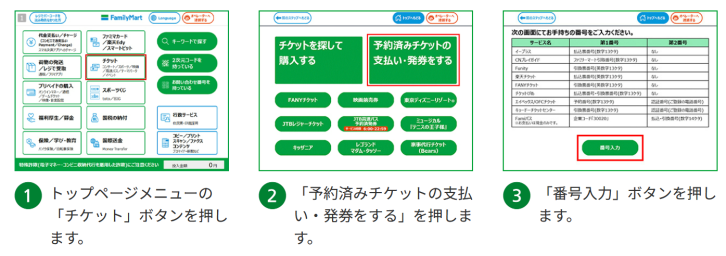
a) Method 1: Click "代金支払 Payment/Charge" in the top left corner, click "次へ (Next)", and then click "番号入力 (Enter Number)".

b) Method 2: Click "チケット (Tickets)", then "予約済みチケットの支払い・発券をする (Pay for/Issue Reserved Tickets)", and finally click "番号入力 (Enter Number)".
4、According to the prompt in the upper left corner, the first number you enter is the 第一番号(企業コード). Using the image from the previous text as an example, enter "30020". Click "OK".

5、According to the prompt in the upper left corner, the second number you enter is the 第二番号(引換番号). Using the image from the previous text as an example, enter "85014384270678". Click "OK".

After waiting, if you are a friend who chose to pay for the ticket at FamilyMart, a prompt will appear stating that this ticket "must" be paid for with cash. Click "同意 (Agree)" to proceed to a page where you should check if the displayed ticket information is consistent with the information in your email (this is just to confirm you are not collecting the wrong ticket).


7、If there are no issues, click "確認 (Confirm)" and wait for the printer to completely print the receipt, "Mコピーサービス申込券 (M Copy Service Application Voucher)", before reaching out to pull the receipt.
Take this "Mコピーサービス申込券" to the store's cash register within 30 minutes, give the receipt to the staff, pay the cash, and they will give you the ticket stub.
Remember to check that the ticket stub they give you is correct!

You have finished. Remember to keep your ticket stub; it is your proof for exchanging it for the wristband on the day of the event.

 简体中文
简体中文  English
  日本語
日本語
Leave a Reply